Dahua SD1A404DB-GNY
By Dahua
4MP PTZ Camera Dahua SD1A404DB-GNY WizSense, 4x optical zoom, Starlight, SMD 3.0, IP66, IK08, PoE, built-in microphone

This page has been visited ... times
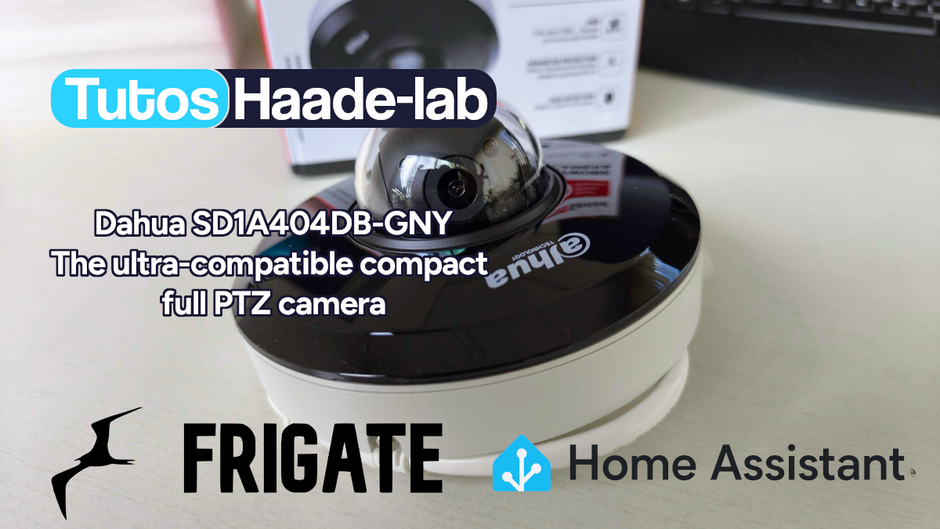
Following my Reolink Trackmix Poe camera test, I mentioned having found my ideal camera with a Dahua model. Well, here we are! Let me introduce the Dahua SD1A404DB-GNY, a compact 4MP PTZ camera from the WizSense range that ticks all the boxes for a perfect integration into Frigate and Home Assistant. Autotracking, full ONVIF support, 120dB WDR, AI SMD 3.0… all in an ultra-compact form factor.
Why did I prefer this Dahua over the Reolink? Simple: reduced dimensions, native ONVIF compatibility with relative movement support (essential for Frigate autotracking), complete video stream configuration (compression, resolution, bitrate…) and an unbeatable price-to-quality ratio on Aliexpress at around €130-165 delivered.

Before diving into the subject, let me briefly introduce Dahua Technology. Founded in 2001 in Hangzhou, China by Fu Liquan (former defense industry engineer), the company is today the 2nd largest video surveillance manufacturer worldwide right behind Hikvision. Listed on the Shenzhen Stock Exchange since 2008, Dahua invests approximately 10% of its annual revenue in R&D, which explains the constant level of innovation in their products.
Key milestones:
Dahua stands out with proprietary technologies like Starlight (ultra-low light vision), WizSense (embedded AI) and Smart H.265+ (intelligent compression). Build quality is excellent, housings are robust and sensors are top-notch.
Dahua offers a complete ecosystem with the DMSS smartphone app, the SmartPSS desktop software, and ONVIF Profiles S, G and T compatibility for interoperability with third-party systems.
One thing I particularly like about Dahua is the extremely comprehensive settings panel in their cameras’ web interface. Unlike Reolink where settings are limited, with Dahua you have full control over every video stream.
I ordered the Dahua SD1A404DB-GNY on Aliexpress for about €171 delivered. The package arrived well protected, and inside you’ll find:

The first impression is that of a compact and well-finished product. The housing is entirely made of aluminium and high-density ABS, the polycarbonate dome is firmly attached. You immediately feel a professional quality product.

What immediately won me over with this camera is its ultra-compact form factor. With a diameter of only 128 mm and a height of 65.4 mm for a featherweight of 500 grams, it’s incomparably more discreet than the Reolink Trackmix Poe and its 228 x 147 x 110 mm for 1.21 kg. Ideal for installation under a porch or on a facade without spoiling the aesthetics of the house.

The Dahua SD1A404DB-GNY features a 1/2.8” 4 Megapixel CMOS sensor coupled with a 4x optical zoom (2.8-12mm). Thanks to Starlight technology, it goes down to 0.005 lux in colour and 0.0005 lux in black and white, allowing it to produce sharp images even in very low light conditions. The built-in infrared reaches up to 20 metres.

The major advantage of this camera is that it goes almost unnoticed, the dimensions are significantly smaller than the competition in this price range.
I’ve compiled below all the technical specifications so you can get a complete picture of the product.
Sensor and Optics
| Image Sensor | 1/2.8” 4 Megapixel CMOS |
| Max Resolution | 2560 × 1440 (4MP) at 25/30 fps |
| Lens | 2.8 mm – 12 mm, F1.8 |
| Optical Zoom | 4x |
| Field of View | H: 96.9°–31.6°, V: 51.4°–17.8°, D: 116.2°–36.4° |
| Min. Illumination | 0.005 lux @ F1.8 (colour), 0.0005 lux (B&W), 0 lux (IR) |
| WDR | 120 dB |
| IR Night Vision | Up to 20 m (65.62 ft) |
| Technology | Starlight |
Pan & Tilt
| Pan Range | 0° to 355° |
| Tilt Range | 5° to 90° |
| Pan Speed | 0.1°/s – 70°/s |
| Tilt Speed | 0.1°/s – 30°/s |
| Presets | 300 programmable positions |
| Tours/Patrols | 8 tours (up to 32 presets per tour) |
| PTZ Protocol | DH-SD (native), ONVIF (external) |
Compression and Network
| Video Format | Smart H.265+ / H.265 / H.264+ / H.264 |
| ONVIF | Profiles S, G, T |
| Protocols | RTSP, HTTP, HTTPS, ONVIF, TCP/IP, UDP |
| Ethernet Port | RJ45 10/100 Mbps |
Artificial Intelligence (WizSense)
| SMD 3.0 | Smart Motion Detection (humans/vehicles) |
| Perimeter Protection | Tripwire, intrusion detection |
| Face Detection | Yes |
| People Counting | Yes (queue, area occupancy) |
Audio and Storage
| Audio | Built-in microphone (1 input / 1 output) |
| Local Storage | MicroSD slot (up to 512 GB) |
Power and Protection
| Power Supply | 12V DC 2A / PoE (IEEE 802.3af) |
| Weatherproofing | IP66 |
| Vandal Resistance | IK08 |
| Operating Temperature | -30°C to +60°C |
Dimensions and Weight
| Dimensions | Ø128 mm × 65.4 mm (H) |
| Weight | 500 g |
One of the big strengths of Dahua compared to Reolink is the web configuration interface. By connecting to the camera’s IP address from your browser, you access an extremely comprehensive settings panel.

You can configure:

This level of configuration is a real advantage when integrating the camera into a system like Frigate, as you can optimise each stream independently.
PTZ is the heart of this camera. Pan-Tilt-Zoom, three essential functions for active surveillance and target tracking.
The Dahua SD1A404DB-GNY offers a pan range of 0° to 355° with rotation speeds from 0.1°/s to 70°/s. Tilt goes from 5° to 90° at speeds of 0.1°/s to 30°/s. Movements are smooth and silent, the motor is well calibrated and generates almost no noise even at high speed.
The 4x optical zoom (2.8-12mm) allows you to switch from a wide-angle field of view of 96.9° to a narrow field of 31.6°. It’s sufficient for residential surveillance or small businesses. For parking lot or large area surveillance, you’ll need models with more substantial zoom (25x or 30x).
The zoom operates continuously and smoothly unlike Reolink cameras where zoom advances in increments when controlled via ONVIF. This is something I noted in my Reolink Trackmix Poe test.
You can program up to 300 preset positions and 8 patrol tours containing up to 32 presets each. This is particularly useful for:
The Dahua SD1A404DB-GNY doesn’t have native autotracking, but it’s perfectly compatible with Frigate’s software autotracking thanks to its full ONVIF support, particularly RelativePanTiltTranslationSpace. This is precisely what differentiates it from Reolink where this ONVIF function is not operational.

Several methods are available to integrate the Dahua SD1A404DB-GNY into Home Assistant:
The simplest method, directly available in Home Assistant without additional installation.

In Settings → Devices & Services → Add Integration → ONVIF, enter:
You’ll get: live stream, motion events, PTZ control (pan, tilt, zoom) and snapshots.
For more advanced control, install the Dahua integration available in HACS:
Link to the rroller/dahua GitHub repository
This integration surfaces IVS events (smart detection), SMD alerts, alarm management and many additional sensor entities not available via ONVIF.

This is the method I recommend and use daily. The complete stack is:
Dahua Camera → go2rtc → Frigate → Home Assistant
This architecture provides:
To use this method you'll need to install Frigate, Mosquitto MQTT and the Frigate HACS integration in Home Assistant.
Let’s get to the main course: full integration into Frigate with stream configuration, ONVIF and autotracking.
RTSP URLs follow the standard Dahua format:
| Stream | URL |
| Main Stream (high resolution) | rtsp://user:pass@IP/cam/realmonitor?channel=1&subtype=0 |
| Sub Stream (low resolution) | rtsp://user:pass@IP/cam/realmonitor?channel=1&subtype=1 |
| Extra Stream | rtsp://user:pass@IP/cam/realmonitor?channel=1&subtype=2 |
Below is the complete and functional configuration I use for the Dahua SD1A404DB-GNY in Frigate, including go2rtc, video streams, ONVIF and autotracking:
# ============================================
# Frigate Configuration - Dahua SD1A404DB-GNY
# ============================================

# Hardware acceleration (adapt to your hardware)
ffmpeg:
  hwaccel_args: preset-vaapi
  output_args:
    record: preset-record-generic-audio-copy
  global_args: -hide_banner -loglevel warning

# Detector (Google Coral recommended)
detectors:
  coral:
    type: edgetpu
    device: pci

# go2rtc configuration
go2rtc:
  rtsp:
    username: [LOGIN]
    password: [PASS]
  webrtc:
    candidates:
      - [FRIGATE-IP]:8555
      - stun:8555

  streams:
    dahua_ptz_main:
      - ffmpeg:[LOGIN]:[PASS]@[CAMERA-IP]/cam/realmonitor?channel=1&subtype=0
      - rtsp://[LOGIN]:[PASS]@[CAMERA-IP]/cam/realmonitor?channel=1&subtype=0
    dahua_ptz_sub:
      - rtsp://[LOGIN]:[PASS]@[CAMERA-IP]/cam/realmonitor?channel=1&subtype=1

# Dahua SD1A404DB-GNY Camera
cameras:

  dahua_ptz:
    enabled: true
    ffmpeg:
      inputs:
        - path: rtsp://127.0.0.1:8554/dahua_ptz_main
          input_args: preset-rtsp-restream
          roles:
            - record
            - audio
        - path: rtsp://127.0.0.1:8554/dahua_ptz_sub
          input_args: preset-rtsp-restream
          roles:
            - detect

    detect:
      width: 1280
      height: 720
      fps: 5

    live:
      streams:
        Main Stream: dahua_ptz_main
        Sub Stream: dahua_ptz_sub

    # ONVIF configuration for PTZ control
    onvif:
      host: [CAMERA-IP]
      port: 80
      user: [LOGIN]
      password: [PASS]

    # PTZ Autotracking
    autotracking:
      enabled: true
      calibrate_on_startup: false
      zooming: disabled
      zoom_factor: 0.3
      track:
        - person
        - car
      return_preset: home
      timeout: 10

    record:
      enabled: true
      retain:
        days: 7
      events:
        retain:
          default: 14

    snapshots:
      enabled: true
      retain:
default: 14go2rtc — we use go2rtc as a stream manager to avoid multiple connections to the camera. The main stream (subtype=0) at 4MP for recording, and the extra stream (subtype=2) at 720p for detection to reduce CPU load.
onvif — the ONVIF port is 80 on Dahua cameras (not 8000 as with some manufacturers). This is essential for PTZ control and autotracking.
autotracking — the above configuration enables autotracking that will automatically follow people and vehicles detected by Frigate by controlling the PTZ via ONVIF.
Before configuring autotracking in Frigate, you must first create a PTZ preset named 'home' in the Dahua camera web interface. This is the rest position the camera will return to after tracking.
Step 1 — Create the “home” preset in the camera
Log into the camera web interface → PTZ tab → position the camera to your desired default view → save the preset as “home”
Step 2 — Enable ONVIF
In the web interface: Network → ONVIF → enable the service and verify the port is 80
Step 3 — Initial calibration
On first launch with calibrate_on_startup: true, Frigate will automatically rotate the camera in all directions to calibrate movement speed and field of view. Let it run, it takes about 1 minute.
Step 4 — After calibration
Once calibration succeeds, Frigate auto-populates movement_weights in your configuration. Then change calibrate_on_startup: false to avoid recalibrating on every restart.
# PTZ Autotracking
    autotracking:
      enabled: true
      calibrate_on_startup: true <====
      zooming: absolute
      zoom_factor: 0.3
      track:
        - person
        - car
      return_preset: home
      timeout: 10
You’ll need to recalibrate if you change the detection FPS, return preset, or zoom settings.
Once the configuration is in place, you’ll find the Dahua SD1A404DB-GNY in the Frigate interface with all PTZ controls working: pan, tilt, zoom, presets and autotracking.

AI detection works perfectly, the Google Coral processes images from the 720p sub stream and identifies people and vehicles with excellent reliability thanks to SMD 3.0 which pre-filters on the camera side.
Thanks to the advanced camera card custom card available in HACS, you can integrate the Frigate stream directly into the Home Assistant dashboard with all PTZ controls.
type: custom:advanced-camera-card
cameras:
  - camera_entity: camera.dahua_ptz
    live_provider: go2rtc
    go2rtc:
      modes:
        - webrtc
        - mse
frigate:
  url: http://[FRIGATE-IP]:5000
menu:
  style: outside
  position: bottom
  buttons:
    ptz:
      enabled: true
    microphone:
      enabled: true
      type: toggle
    screenshot:
      enabled: true
    clips:
      enabled: true
    snapshots:
      enabled: true
    timeline:
      enabled: true
    fullscreen:
      enabled: true
live:
  auto_unmute: []
  controls:
    builtin: true
    ptz:
      mode: frigate
dimensions:
  aspect_ratio_mode: static
  aspect_ratio: "16:9"
Unlike the Reolink Trackmix Poe where zoom advanced jerkily, with the Dahua zoom is smooth and continuous when holding the + and - buttons, the ONVIF relative function is fully operational.
Dahua also offers the WiFi version of this camera under the reference SD1A404DB-GNY-W. It retains all the characteristics of the PoE version with the addition of WiFi connectivity. Handy if you can’t run a network cable to the desired location.
For use with Frigate and continuous video recording, I strongly recommend the wired PoE version. WiFi can introduce latency and packet loss that impact RTSP stream quality.
For a clean and waterproof installation, I recommend using a dedicated junction box. It allows you to neatly house the RJ45 and power cables while maintaining the IP66 waterproofing of the entire setup.

The Dahua SD1A404DB-GNY is for me the best PTZ camera in this price range for a complete home automation integration. Where the Reolink Trackmix Poe falls short with its imposing dimensions and non-functional ONVIF autotracking in Frigate, the Dahua excels with its ultra-compact form factor, its complete ONVIF support and its professional-grade settings panel.
The integration into Frigate with autotracking works perfectly, PTZ control is smooth, the continuous zoom is a real joy to use compared to the competition. WizSense AI SMD 3.0 adds an intelligent layer directly from the camera, and Starlight image quality with 120dB WDR is impressive day and night.
If you’re looking for a compact, discreet PTZ camera that’s 100% compatible with Frigate autotracking for your smart home, the Dahua SD1A404DB-GNY is my unreserved recommendation.
Some time ago I tested the Tedee Go smart lock and its accessories. The product left me with an unfinished feeling: noisy (70dB!), power-hungry and limited in connectivity. Today I’m...

I’ve been looking for a compact and silent multi-channel controller to drive my 24V DC irrigation system for quite some time. After testing Zigbee solutions like the Sonoff SWV or...
After testing the SLZB-MR4U multi-radio dongle, I’m turning back to the SMLIGHT brand for a radically different yet equally exciting product: the SMHUB NANO MG24.
Copyright © 2026 Haade 🎉 by Nicoxygen

Comments