Kincony B8M ESP32 8-channel MOSFET controller test for irrigation

This page has been visited ... times
Sommary
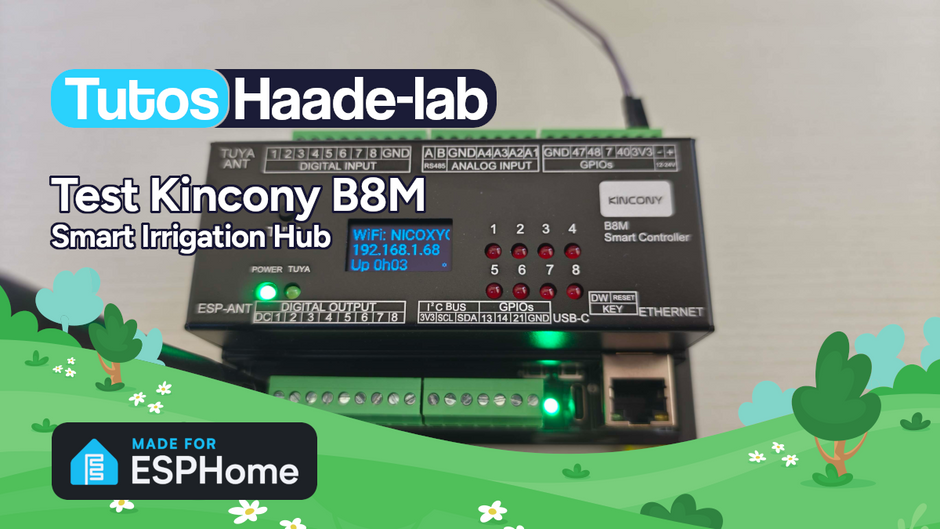
I’ve been looking for a compact and silent multi-channel controller to drive my 24V DC irrigation system for quite some time. After testing Zigbee solutions like the Sonoff SWV or the Woox R7060, I wanted to move to a wired, reliable and fully customisable solution. My choice fell on the Kincony B8M, an ESP32-S3 controller with 8 MOSFET outputs perfect for driving 24V DC irrigation solenoid valves.
In this article I present this product in detail, its complete integration into ESPHome and Home Assistant, and I compare it with its direct competitor the Waveshare ESP32-S3-ETH-8DI-8RO to help you make the right choice.

 Buy Now out of Aliexpress
The Kincony Brand
Kincony (Hangzhou Kincony Electronics Co., Ltd.) is a Chinese manufacturer founded in 2007 in Hangzhou by Xu Wei. The company specialises in IoT hardware for home automation and industrial automation. Their flagship range, the KC868 series, includes relay boards, DIN-rail controllers and gateways based on ESP32 and Raspberry Pi CM.
What sets Kincony apart from many Chinese manufacturers is their open-source friendly philosophy. They provide schematics, ESPHome configurations, Arduino examples and an active community on their forum. The hardware is recognised as reliable and well-built, representing a serious and affordable alternative to proprietary systems like KNX or Loxone.
Info
Kincony targets engineers, DIY enthusiasts and system integrators. It's not consumer plug-and-play — you'll need to get your hands dirty with ESPHome or Arduino.
The weak point often mentioned by the community is the after-sales support which is limited (WhatsApp, forum, YouTube). Documentation can be fragmented, but ESPHome configurations are provided.
Unboxing
The Kincony B8M comes in a DIN-rail ABS enclosure ready to install in an electrical panel. Inside the package you’ll find:
- the Kincony B8M controller in its DIN-rail enclosure
- a USB-C cable for programming
- a quick guide with wiring diagrams

The first impression is that of a serious and well-finished product. The DIN-rail enclosure is compact and robust, screw terminals are well labelled and good quality. You can feel it’s a product designed for professional use.

Dimensions are compact: 122 × 83 × 59 mm, perfect for fitting into an electrical panel alongside the 24V power supply.

The Kincony B8M Controller
The Kincony B8M is built around an ESP32-S3-WROOM-1U (N16R8) with 16MB Flash and 8MB PSRAM, making it a powerful module capable of handling many ESPHome entities without breaking a sweat.

What’s On Board
The Kincony B8M doesn’t settle for just 8 MOSFET outputs. It’s a true Swiss army knife of automation:
- 8 MOSFET outputs: DC 12-24V, 10A per channel (driven via PCF8574/PCF8575 over I2C)
- 8 digital inputs: optocoupler-isolated dry contact, cables up to 500 metres!
- 4 analog inputs: via ADS1115 16-bit ADC (2× 0-5V + 2× 4-20mA)
- Ethernet: RJ45 100Mbps via W5500
- WiFi & Bluetooth: native ESP32-S3
- RS485: for industrial sensors (Modbus)
- DS3231 RTC: high-precision clock with battery (schedules work even without internet)
- SSD1306 OLED display: shows IP address and connection status
- SD Card slot: for local storage
- I2C port: expandable with additional sensors
- USB-C: for programming and power
Warning
Warning! MOSFET outputs only work with DC (12-24V). It's impossible to switch 220V AC directly. For 220V you'll need an external relay module or turn to the Waveshare.

Technical Specifications Kincony B8M
Processor and Memory
| MCU | ESP32-S3-WROOM-1U (N16R8) |
| Flash | 16 MB |
| PSRAM | 8 MB |
| Frameworks | ESPHome, Tasmota, Arduino, MicroPython, ESP-IDF |
Outputs
| Type | MOSFET (DC switching only) |
| Channels | 8 |
| Max Current | 10A per channel |
| Load Voltage | DC 12-24V |
| Switching | Silent, fast (µs), unlimited lifespan |
Inputs
| Digital Inputs | 8× optocoupler-isolated dry contact (up to 500m cable) |
| Analog Inputs | 4× via ADS1115 16-bit (2× 0-5V, 2× 4-20mA) |
Connectivity
| Ethernet | RJ45 100Mbps (W5500 SPI) |
| WiFi | 2.4GHz 802.11 b/g/n |
| Bluetooth | BLE native ESP32-S3 |
| RS485 | TX: GPIO39, RX: GPIO38 |
| USB-C | Programming / power |
| I2C | SDA: GPIO8, SCL: GPIO18 |
Onboard Peripherals
| RTC | DS3231 high-precision (I2C address 0x68) |
| Display | SSD1306 OLED (I2C address 0x3C) |
| Storage | SD card slot (SPI) |
Power and Dimensions
| Power Supply | DC 12-24V |
| Dimensions | 122 × 83 × 59 mm |
| Mounting | DIN Rail |
Pros Kincony B8M
- 8 silent MOSFET outputs (unlimited lifespan)
- Powerful ESP32-S3 (16MB Flash, 8MB PSRAM)
- 4 ADS1115 analog inputs (soil moisture, pressure sensors…)
- DS3231 RTC with battery (offline scheduling)
- Built-in OLED display
- Ethernet + WiFi + Bluetooth
- RS485 for industrial sensors
- Optocoupler-isolated digital inputs up to 500m
- Professional DIN-rail enclosure
- ESPHome and Tasmota supported
Cons Kincony B8M
- DC only (no 220V AC)
- Fragmented documentation
- Limited after-sales support
- No PoE
- I2C addresses vary between board revisions
- Higher price than relay competition (~$80 vs ~$50)
Why the Kincony B8M for Irrigation?
My irrigation system runs on 24V DC solenoid valves, the standard for professional irrigation systems (Hunter, Rain Bird, etc.). The Kincony B8M is perfect for this use case:
- 8 irrigation zones: each MOSFET output drives a 24V DC solenoid valve
- Silent switching: no relay clicking in the panel
- Unlimited lifespan: MOSFETs have no mechanical parts to wear out
- Analog inputs: I can connect soil moisture sensors (0-5V) to automate watering based on actual humidity
- DS3231 RTC: schedules work even if Home Assistant or the network goes down
- Ethernet: reliable wired connection, no WiFi issues in the garden

The 24V DC power supply that feeds the Kincony B8M also directly powers the solenoid valves through the MOSFET outputs. One power cable and one Ethernet cable, the rest is solenoid valve wiring. Ultra simple.
ESPHome Integration
This is where it gets interesting. ESPHome fully supports the Kincony B8M and it’s the method I recommend for Home Assistant integration.
Initial Flash
The first flash is done via USB-C. There’s an important trick:
Warning
During the first flash, you must hold the DW (Download) button while powering on to enter bootloader mode. Without this, the flash will fail with a 'download data fail' error.
Once the first flash succeeds, all subsequent updates are done OTA (Over-The-Air) over the network.
Complete ESPHome Configuration
Below is my complete and working configuration for the Kincony B8M adapted for irrigation. All 8 outputs are configured as switches, 8 inputs as binary sensors, and all 4 analog inputs are active for soil moisture sensors:

However, if you wish to integrate it, you will need to enable either Wi-Fi or RJ45 in the code; the two cannot work simultaneously.
esphome:
  name: kincony-b8m
  friendly_name: Irrigation B8M

esp32:
  board: esp32-s3-devkitc-1
  framework:
    type: arduino

# --- Logging ---
logger:

# --- Home Assistant API ---
api:
  encryption:
    key: "YOUR_API_KEY"

# --- OTA Updates ---
ota:
  - platform: esphome
    password: "YOUR_OTA_PASSWORD"

# --- Ethernet (W5500 via SPI) ---
ethernet:
  type: W5500
  clk_pin: GPIO1
  mosi_pin: GPIO2
  miso_pin: GPIO41
  cs_pin: GPIO42
  interrupt_pin: GPIO43
  reset_pin: GPIO44

# --- I2C Bus ---
i2c:
  - id: bus_a
    sda: GPIO8
    scl: GPIO18
    scan: true
    frequency: 400kHz

# --- PCF8574 I/O Expanders ---
pcf8574:
  - id: pcf8574_hub_out_1
    i2c_id: bus_a
    address: 0x24
    pcf8575: true
  - id: pcf8574_hub_in_1
    i2c_id: bus_a
    address: 0x22

# --- 8 MOSFET Outputs (irrigation zones) ---
switch:
  - platform: gpio
    name: "Zone 1 - Front Lawn"
    id: zone_1
    pin:
      pcf8574: pcf8574_hub_out_1
      number: 0
      mode: OUTPUT
      inverted: true
  - platform: gpio
    name: "Zone 2 - Back Lawn"
    id: zone_2
    pin:
      pcf8574: pcf8574_hub_out_1
      number: 1
      mode: OUTPUT
      inverted: true
  - platform: gpio
    name: "Zone 3 - Flower Beds"
    id: zone_3
    pin:
      pcf8574: pcf8574_hub_out_1
      number: 2
      mode: OUTPUT
      inverted: true
  - platform: gpio
    name: "Zone 4 - Vegetable Garden"
    id: zone_4
    pin:
      pcf8574: pcf8574_hub_out_1
      number: 3
      mode: OUTPUT
      inverted: true
  - platform: gpio
    name: "Zone 5 - Hedges"
    id: zone_5
    pin:
      pcf8574: pcf8574_hub_out_1
      number: 4
      mode: OUTPUT
      inverted: true
  - platform: gpio
    name: "Zone 6 - Drip Irrigation"
    id: zone_6
    pin:
      pcf8574: pcf8574_hub_out_1
      number: 5
      mode: OUTPUT
      inverted: true
  - platform: gpio
    name: "Zone 7 - Spare 1"
    id: zone_7
    pin:
      pcf8574: pcf8574_hub_out_1
      number: 6
      mode: OUTPUT
      inverted: true
  - platform: gpio
    name: "Zone 8 - Spare 2"
    id: zone_8
    pin:
      pcf8574: pcf8574_hub_out_1
      number: 7
      mode: OUTPUT
      inverted: true

# --- 8 Digital Inputs (dry contact) ---
binary_sensor:
  - platform: gpio
    name: "Input 1"
    pin:
      pcf8574: pcf8574_hub_in_1
      number: 0
      mode: INPUT
      inverted: true
  - platform: gpio
    name: "Input 2"
    pin:
      pcf8574: pcf8574_hub_in_1
      number: 1
      mode: INPUT
      inverted: true
  - platform: gpio
    name: "Input 3"
    pin:
      pcf8574: pcf8574_hub_in_1
      number: 2
      mode: INPUT
      inverted: true
  - platform: gpio
    name: "Input 4"
    pin:
      pcf8574: pcf8574_hub_in_1
      number: 3
      mode: INPUT
      inverted: true
  - platform: gpio
    name: "Input 5"
    pin:
      pcf8574: pcf8574_hub_in_1
      number: 4
      mode: INPUT
      inverted: true
  - platform: gpio
    name: "Input 6"
    pin:
      pcf8574: pcf8574_hub_in_1
      number: 5
      mode: INPUT
      inverted: true
  - platform: gpio
    name: "Input 7"
    pin:
      pcf8574: pcf8574_hub_in_1
      number: 6
      mode: INPUT
      inverted: true
  - platform: gpio
    name: "Input 8"
    pin:
      pcf8574: pcf8574_hub_in_1
      number: 7
      mode: INPUT
      inverted: true

# --- ADS1115 Analog Inputs ---
ads1115:
  - address: 0x48
    id: ads1115_hub
    i2c_id: bus_a

sensor:
  - platform: ads1115
    ads1115_id: ads1115_hub
    multiplexer: 'A0_GND'
    gain: 6.144
    name: "Soil Moisture Zone 1 (0-5V)"
    update_interval: 60s
    unit_of_measurement: "V"
    icon: "mdi:water-percent"
  - platform: ads1115
    ads1115_id: ads1115_hub
    multiplexer: 'A1_GND'
    gain: 6.144
    name: "Soil Moisture Zone 2 (0-5V)"
    update_interval: 60s
    unit_of_measurement: "V"
    icon: "mdi:water-percent"
  - platform: ads1115
    ads1115_id: ads1115_hub
    multiplexer: 'A2_GND'
    gain: 6.144
    name: "Water Pressure (4-20mA)"
    update_interval: 30s
    unit_of_measurement: "mA"
    icon: "mdi:gauge"
  - platform: ads1115
    ads1115_id: ads1115_hub
    multiplexer: 'A3_GND'
    gain: 6.144
    name: "Water Flow (4-20mA)"
    update_interval: 30s
    unit_of_measurement: "mA"
    icon: "mdi:water-pump"

# --- DS3231 RTC ---
time:
  - platform: ds3231
    i2c_id: bus_a
    address: 0x68
    id: my_rtc

# --- SSD1306 OLED Display ---
font:
  - file: "gfonts://Roboto"
    id: roboto
    size: 12

display:
  - platform: ssd1306_i2c
    model: "SSD1306 128x64"
    address: 0x3C
    i2c_id: bus_a
    lambda: |-
      it.printf(0, 0, id(roboto), "Irrigation B8M");
      if (id(my_rtc).now().is_valid()) {
        it.strftime(0, 16, id(roboto), "%d/%m %H:%M", id(my_rtc).now());
      }
      int active = 0;
      if (id(zone_1).state) active++;
      if (id(zone_2).state) active++;
      if (id(zone_3).state) active++;
      if (id(zone_4).state) active++;
      if (id(zone_5).state) active++;
      if (id(zone_6).state) active++;
      if (id(zone_7).state) active++;
      if (id(zone_8).state) active++;
      it.printf(0, 32, id(roboto), "Active zones: %d/8", active);
Help
PCF8574 I2C addresses (0x22 and 0x24) may vary between board revisions. Enable scan: true on the I2C bus and check addresses in the ESPHome boot logs.
Result in Home Assistant
Once the firmware is flashed, the Kincony B8M is automatically discovered by Home Assistant via the ESPHome integration. You instantly get:
- 8 switches (irrigation zones)
- 8 binary sensors (inputs)
- 4 analog sensors (soil moisture, pressure, flow)


Irrigation Automation
With the entities surfaced in Home Assistant, you can create smart irrigation automations. For example:
- Zone-based watering with programmed durations
- Automatic stop if the soil moisture sensor indicates sufficiently moist soil
- Watering prohibition if rain is forecast (via weather integration)
- Seasonal scheduling with variable durations based on the time of year
Rather than building everything from scratch with native automations, I strongly recommend the Irrigation V5 component available in HACS.
Irrigation V5: The Essential HACS Module
Irrigation V5 is a custom component developed by petergridge that turns Home Assistant into a professional irrigation controller. Paired with the Kincony B8M’s 8 MOSFET outputs, it’s the perfect combination.

Installation
- Open HACS in Home Assistant
- Search for “Irrigation Controller Component”
- Install the component and restart Home Assistant
- Go to Settings → Devices & Services → Add Integration → Irrigation
- Configure your first watering programme
Help
The custom Lovelace irrigation-card is included with the component. It gives you a complete visual interface to manage your zones directly from the dashboard.
Key Features of Irrigation V5
What makes this component powerful with the Kincony B8M:
- Multi-zone programmes: configure each B8M MOSFET output as an independent irrigation zone with its own watering duration
- Flexible scheduling: start by fixed time, sunrise/sunset, or manual trigger
- ECO mode: water/wait/repeat cycle that lets water soak into the soil between bursts, reducing runoff. Ideal for clay soils
- Rain sensor: link a binary sensor (or weather data) to automatically suspend watering when it rains. Configurable per zone (you can exclude covered patios for example)
- Water source sensor: stops watering if well or tank level is too low
- Automatic adjustment: increase or decrease watering duration based on external factors (temperature, soil moisture via the B8M’s ADS1115 analog inputs)
- Multi-programme: you can add the integration multiple times to create separate schedules (lawn in the morning, vegetable garden in the evening)
Configuration with the Kincony B8M
Here’s how to map Irrigation V5 zones to the Kincony B8M’s MOSFET outputs:
# Irrigation V5 configuration example
# ESPHome switches from the B8M serve as zones

# In the Irrigation V5 configuration (via UI):
# Zone 1 → switch.zone_1_front_lawn
# Zone 2 → switch.zone_2_back_lawn
# Zone 3 → switch.zone_3_flower_beds
# Zone 4 → switch.zone_4_vegetable_garden
# Zone 5 → switch.zone_5_hedges
# Zone 6 → switch.zone_6_drip_irrigation

# Rain sensor (optional):
# binary_sensor.rain_sensor (via weather integration or physical sensor)

# Soil moisture adjustment (optional):
# sensor.soil_moisture_zone_1_0_5v (ADS1115 analog input from the B8M)
The advantage of Irrigation V5 over native automations is centralised management: you get a single Lovelace card showing all your zones, next scheduled waterings, rain sensor status and remaining time for each active zone. No more juggling 15 different automations.

Info
ECO mode is particularly well-suited to the B8M's MOSFET outputs: silent and ultra-fast switching allows very short water/pause cycles without mechanical wear, where a standard relay would wear out prematurely.
Other Integration Methods
Besides ESPHome, the Kincony B8M supports other methods:
|Method|Effort|Description| |ESPHome (recommended)|Medium|Flash via USB-C, native HA integration, auto-discovered entities| |KCS v3 + MQTT|Low|Factory firmware, MQTT auto-discovery in HA, also supports Apple HomeKit| |Tasmota|Medium|Flash Tasmota, integrate via MQTT or native| |Arduino / MicroPython|High|Custom firmware, communication via MQTT or REST API|
Info
The factory KCS v3 firmware supports MQTT auto-discovery and Apple HomeKit. If you don't want to get into ESPHome, it's a turnkey option.
Comparison: Kincony B8M vs Waveshare ESP32-S3-ETH-8DI-8RO
Now let’s compare the Kincony B8M with its closest competitor: the Waveshare ESP32-S3-ETH-8DI-8RO. Waveshare is a well-known manufacturer based in Shenzhen, founded in 2007, specialising in development modules, displays and IoT boards. Their reputation for industrial-grade quality is solid.
Warning
Fundamental difference: the Kincony B8M uses MOSFET outputs (DC only, silent) while the Waveshare uses mechanical relays (AC and DC, with clicking). This choice directly impacts use cases!

Detailed Comparison Table
| Feature | Kincony B8M - 89€ | Waveshare ESP32-S3-ETH-8DI-8RO - 53€ |
| Output Type | MOSFET (solid-state) | Mechanical Relay (NO/COM/NC) |
| AC 220V Load | ❌ No (DC only) | ✅ Yes (up to 250V AC 10A) |
| DC Load | ✅ 12-24V DC 10A | ✅ Up to 30V DC 10A |
| Silent Switching | ✅ Yes | ❌ No (clicking) |
| PWM / Dimming | ✅ Possible (LED, motor) | ❌ No (on/off only) |
| Lifespan | Unlimited (no mechanical parts) | Limited (~100K-1M cycles) |
| Processor | ESP32-S3-WROOM-1U (N16R8) | ESP32-S3 |
| Memory | 16MB Flash / 8MB PSRAM | 16MB Flash / 8MB PSRAM |
| Ethernet | ✅ W5500 100Mbps | ✅ W5500 100Mbps |
| WiFi / BT | ✅ / ✅ | ✅ / ✅ BLE 5.0 |
| Digital Inputs | 8× optocoupler (500m) | 8× optocoupler |
| Analog Inputs | ✅ 4× ADS1115 (0-5V, 4-20mA) | ❌ None |
| RS485 | ✅ Yes | ✅ Yes (or CAN on “-C” variant) |
| CAN Bus | ❌ No | ✅ On “-C” variant |
| PoE | ❌ No | ✅ On POE variant (~+$15) |
| RTC | ✅ DS3231 high-precision + battery | ✅ Basic RTC |
| OLED Display | ✅ SSD1306 built-in | ❌ No |
| SD Card | ✅ Yes | ✅ Yes |
| Power Supply | DC 12-24V | DC 7-36V (wider range) |
| DIN-rail Enclosure | ✅ Yes | ✅ Yes |
| ESPHome | ✅ Supported | ✅ Supported (devices.esphome.io) |
| Approximate Price | ~$80 / €75 | ~$50 / €45 |
MOSFET vs Relay: What’s the Impact?
MOSFET outputs (Kincony B8M):
- ✅ Silent and ultra-fast switching (microseconds)
- ✅ Unlimited lifespan (no mechanical parts)
- ✅ PWM capable for LED dimming or motor speed control
- ❌ DC only (12-24V) — cannot switch 220V AC
Mechanical relays (Waveshare):
- ✅ Switch both AC and DC (up to 250V AC!)
- ✅ NO/COM/NC contacts (normally open or closed)
- ✅ Natural galvanic isolation
- ❌ Audible clicking on each switching
- ❌ Limited lifespan (mechanical wear)
- ❌ No PWM/dimming
Waveshare in Detail
The Waveshare comes in 4 variants:
| Model | PoE | Bus | Approx. Price |
| ESP32-S3-ETH-8DI-8RO | ❌ | RS485 | ~$45-50 |
| ESP32-S3-ETH-8DI-8RO-C | ❌ | Isolated CAN | ~$45-50 |
| ESP32-S3-POE-ETH-8DI-8RO | ✅ | RS485 | ~$55-65 |
| ESP32-S3-POE-ETH-8DI-8RO-C | ✅ | Isolated CAN | ~$55-65 |
The Waveshare’s strong point is clearly the price (~30-45% cheaper) and the relay versatility switching both AC and DC. Additionally, the PoE variant is a real plus for simplified installation.
Which One to Choose?
Choose the Kincony Kincony B8M if:
- You’re driving DC loads only (24V solenoid valves, LED strips, DC motors)
- You need analog inputs (moisture, pressure, flow sensors)
- You want silent switching
- You need a precise RTC for offline scheduling
- You want a built-in OLED display for diagnostics
- You’re doing irrigation with 24V DC solenoid valves → it’s the best choice
Choose the Waveshare ESP32-S3-ETH-8DI-8RO if:
- You need to switch 220V AC (lighting, pumps, appliances)
- You’re on a tight budget (~$50 vs ~$80)
- You need PoE for power-over-Ethernet
- You need a CAN bus (industrial automation)
- Relay clicking doesn’t bother you
- You want a wider power input range (7-36V vs 12-24V)
Info
For my 24V DC irrigation use case, the Kincony B8M was the natural choice: silent MOSFET outputs, analog inputs for soil moisture sensors, and high-precision RTC for autonomous scheduling.
Conclusion
The Kincony B8M is a remarkable controller for anyone needing to drive DC loads in home automation. For my 24V DC irrigation system, it’s the ideal solution: silent, reliable, packed with features (analog inputs, RTC, OLED display) and perfectly integrated into the ESPHome / Home Assistant ecosystem.
Against the Waveshare, the choice is primarily dictated by load type: MOSFET (DC) vs Relay (AC/DC). Both products are quality, well-supported by ESPHome, and housed in professional DIN-rail enclosures. Waveshare wins on price and AC versatility, Kincony wins on embedded features and silence.
If like me you’re looking for a multi-zone controller for DC irrigation, the Kincony B8M is my recommendation. If you need to switch 220V AC, go for the Waveshare.

Articles that might interest you
Complete integration of the Poolex Aqualyser pool in Home Assistant
With the warm season back, the pool is up and running again — and with it, the daily job of keeping the water balanced. If you own a Poolex Aqualyser...

Nuki Smart Lock Ultra, Fob and Door Sensor test the ultimate smart lock
Some time ago I tested the Tedee Go smart lock and its accessories. The product left me with an unfinished feeling: noisy (70dB!), power-hungry and limited in connectivity. Today I’m...
Dahua SD1A404DB-GNY the full option PTZ camera in Frigate
Following my Reolink Trackmix Poe camera test, I mentioned having found my ideal camera with a Dahua model. Well, here we are! Let me introduce the Dahua SD1A404DB-GNY, a compact...
Comments