Trackmix Poe
By Reolink
Reolink PTZ 4K Outdoor PoE Camera, Dual Lens, 6X Hybrid Zoom, Auto Tracking, Color Night Vision, Person/Vehicle/Animal Detection, Two-Way Audio, TrackMix PoE

This page has been visited ... times
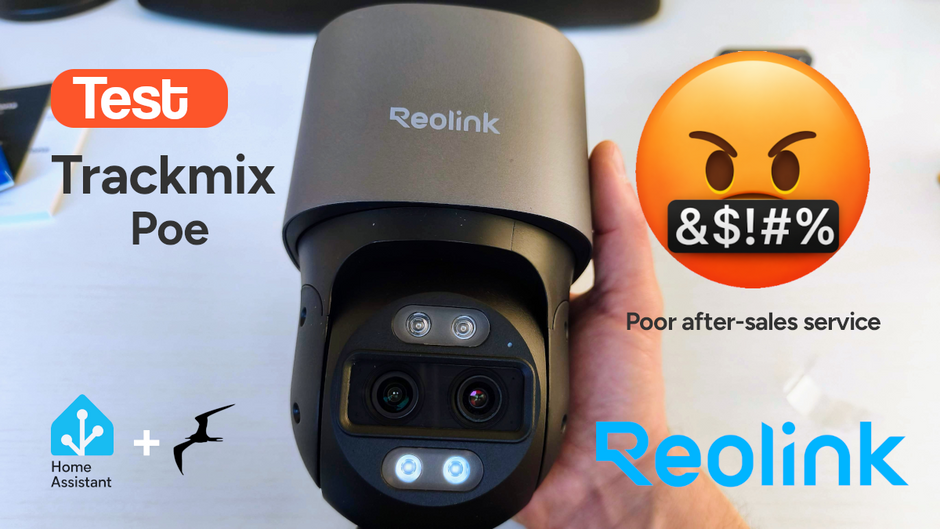
I recently purchased a Reolink Trackmix PoE camera to equip my home and ordered directly from the official Reolink website, Reolink.com. However, I wanted to cancel the order because I have another camera that’s more suitable (smaller size), but the cancellation process with Reolink wasn’t handled correctly.
Before starting this tutorial, I want to vent. Let me explain: I was looking for a PTZ dome camera 100% compatible with Frigate. At the time, I couldn’t find anything that suited me, so I ordered two cameras from the Reolink website. But less than an hour after placing the order, I found exactly what I was looking for on AliExpress: a Dahua camera that’s 100% compatible with Frigate and has the AutoTrack function.
Without hesitation, I wrote to Reolink, and yes, no phone support (I should mention it was a weekday), and less than two hours after placing the order, I met all the conditions in the Terms and Conditions to cancel the order. The result? They took 4 days to reply, and in the meantime, you can imagine, the order had already shipped.
To top it all off, during this period, Veepee had an offer on this camera at 50% off, even though I had already received an 18% discount on their site.
The sales representative offered me a 5% discount to keep the cameras. I asked for an additional 25% or a return of the equipment. I received no response from them, only confirmation that the return shipping would be covered.
So, I returned the equipment at my own expense, as stipulated in the Terms and Conditions.
Without hesitation, I wrote to Reolink, and yes, no phone support (I should mention it was a weekday), and less than two hours after placing the order, so I fulfilled all the conditions in their terms and conditions to cancel the order. The result? They took 4 days to reply, and in the meantime, as you can imagine, the order had already been shipped. To top it all off, during this period, Veepee had a 50% discount on this camera, while I had already received an 18% discount on the other camera. In a future article, I’ll introduce you to the camera I chose instead of the Reolink Trackmix Poe, it’s the Dahua SD1A404DB-GNY which has much smaller dimensions and major advantages, especially for integration into frigate (native autotrack and video stream configuration among others) and at prices similar to the Reolink Trackmix Poe.
In short, I had a few days to test the product before returning it, and that’s how I was able to write this short article.

Reolink manufactures high-quality equipment, and the packaging is no exception. This blue box contains an instruction manual, some extras, the camera, and everything needed to mount it and connect it via RJ45.

I bought this camera for €165, and if you’d like to get it but aren’t in a hurry, Veepee regularly has offers for €115. And I must say it’s really high quality. The electronic unit is made of aluminum, while the lens head is made of ABS. The mounting bracket is also aluminum, a bonus.

The camera Trackmix Poe is a dual-lens camera, one standard lens for wide-angle filming while the second controls zoom and autotracking. Unfortunately, these two lenses are interdependent; I would have liked dual rotation to cover two areas simultaneously, this is not the case. On the head, there are infrared LEDs for night vision, as well as two large white LEDs for color illumination in low light, a microphone input, and speakers on the side. As a bonus, the camera supports two-way audio.
The image quality is excellent day and night, even in low light.

As you can see from the screenshot below, the camera is complete but quite large; unfortunately, it won’t be discreet, especially if, like me, you decide to install it under the porch.

In conclusion, what made me regret this choice was its size.

Thanks to the popularity of the Reolink brand, you can find all sorts of printable connectors for the camera online.
For example, you can find them on makerworld An interesting print for fixing the Reolink camera Trackmix Poe in an angle, there are plenty of others on the web

Important detail: the firmware. I downloaded the corresponding firmware from the Reolink website And guess what? It’s impossible to install on the Trackmix PoE. Either it’s a firmware error or it’s not the correct firmware for this camera. The hardware number on the website doesn’t match the camera’s part number.
The technical specifications are very detailed, as with many cameras. I’ve decided to include them all in the article so you can get a better idea.
Video and Audio
| Image Sensor | 1/3” + 1/2.8” CMOS Sensor |
| Video Resolution | Up to 3840 x 2160 (8.0 megapixels) at 25 frames per second |
| Lens | Function f=2.8mm@F=1.6 and f=8mm@F=1.6 |
| Video Format | H.264, H.265 |
| Field of View | Horizontal: 104° -38° Vertical: 60° -21° |
| Zoom Mode | 6X Hybrid Zoom |
| Day and Night | IR Filter with Automatic Switching |
| Infrared Night Vision | Up to 30 meters (100 feet) (LED: 2 pieces/850 nm) |
| Color Night Vision | Spotlights: 2 pieces/6500 K/450 lumens |
| Audio | Two-way audio |
Power
| PoE | IEEE 802.3af, 48 V active |
| DC Power Supply | 12.0 V DC⎓2 A, <12 W |
Interface
| Power | DC Power Port |
| System | Reset Button |
| Ethernet | One 10 M/100 Mbps RJ45 Port |
| Storage | Micro SD Card Slot (max. 512 GB) |
| Audio | Built-in Microphone and Speaker |
Pan & Tilt
| Pan & Tilt Range | Pan: 355°, Tilt: 0°~90° |
| Pan Speed | 2.5°-90°/s (adjustable speed) |
| Tilt Speed | 1.5°-60°/s (adjustable speed) |
| Preset Points | 32 |
| Auto Tracking | YES |
Software Features
| Refresh Rate | Main Stream: 2 fps – 25 fps Sub Stream: 4 fps – 20 fps |
| Bitrate | Main Stream: 4096 Kbps - 8192 Kbps Sub Stream: 128 Kbps - 1228 Kbps |
| Supported Browsers | Edge, Chrome, Firefox, Safari |
| Supported Operating Systems | PC: Windows, Mac OS; Smartphone: iOS, Android |
| Smart Alarms | Motion Detection Person Detection Vehicle Detection Pet Detection |
| Recording Modes | Motion-Triggered Recording (Default) Scheduled Recording 24/7 Recording |
| Tracking Method | Digital Tracking Pan/Tilt Tracking First Digital Tracking First |
| Protocols and Standards | HTTPS, SSL, TCP/IP, UDP, HTTP, IPv4, UPnP, RTSP, RTMP, SMTP, NTP, DHCP, DNS, DDNS, FTP, P2P |
| Maximum User Access | “Supports up to 20 users (1 administrator account and 19 user accounts) up to 12 simultaneous video streams (10 sub-streams and 2 main streams)” |
| Works with | Google Assistant |
Operating Environment
| Operating Temperature | -10°C to +55°C (14°F to 131°F) |
| Operating Humidity | 10% to 90% |
| Waterproof Rating | IP65 |
| Size | Dimensions 228 x 147 x 110 mm |
| Weight | 1.21 kg |
2-Year Limited Warranty. For support, visit https://support.reolink.com/hc/en-us/.
Reolink provides software and Home Assistant integration that is more than satisfactory and rare among camera vendors. It’s available for Android and Apple. I don’t really discuss it in this article, but if you feel the need, let me know.

This QRcode allows you to Download the Reolink app from the Play Store you have the choice between scanning this QRcode from your smartphone or clicking directly on the link below.
In the screenshot below, the two video streams are superimposed, which is very convenient.


This QRcode allows you to Download the Reolink app from the Apple Store you have the choice between scanning this QRcode from your smartphone or clicking directly on the link below.
The Reolink software and the ability to insert an SD card for storing recordings (up to 512GB) will allow you to fully utilize Reolink cameras.
What the software doesn’t allow, and which I think is important:
You won’t find a wide range of settings, but this has the advantage of preventing you from getting lost in menus and allowing you to configure your camera quickly. This is also an advantage of using a Reolink camera if you’re a beginner.

Home Assistant integrates the comprehensive Reolink app by default, which is quite rare in this field, and Reolink deserves credit for its regular participation.

Page dedicated to the brand Reolink on the Home-Assistant website

As you can see from the screenshots you will be able to control everything in home-assistant, the application even offers onvif services in order to automate some functions.

By visiting the Reolink integration’s github page, you realize that the updates are continuous, which is a very good thing.
Reolink application regularly updated on github
Integration into Frigate is straightforward. You’ll find all the configurations for Reolink in the Frigate documentation. In the code below, I’ve decided to integrate three streams: main, sub, and the autotrack stream, which corresponds to the second lens and will allow us to use the zoom.
The autotrack function in Frigate for Reolink cameras is not functional because the ONVIF RelativePanTiltTranslationSpace function is not working. However, you can use the autotrack function directly in the Reolink app to work around this issue.
# accelerateur materiel
ffmpeg:
  hwaccel_args: preset-vaapi
  output_args:
    record: preset-record-generic-audio-copy
  global_args: -hide_banner -loglevel verbose

# Caméra Reolink Trackmix P710
cameras:

  parking:
    enabled: true
    ffmpeg:
      inputs:
        - path: rtsp://127.0.0.1:8554/parking_main
          input_args: preset-rtsp-restream
          roles:
            - record
            - audio
        - path: rtsp://127.0.0.1:8554/parking_sub
          input_args: preset-rtsp-restream
          roles:
            - detect
    detect:
      width: 896
      height: 512
    live:
      streams:
        Main Stream: parking_main
        Sub Stream: parking_sub

    onvif:
      host: [IP-CAMERA]
      port: 8000
      user: [LOGIN-CAMERA]
      password: [PASS-CAMERA]
      tls_insecure: false
      ignore_time_mismatch: false

  parking_autotrack:
    enabled: true
    ffmpeg:
      inputs:
        - path: rtsp://127.0.0.1:8554/parking_autotrack
          roles:
            - record
    detect:
      width: 1920
      height: 1080
    live:
      streams:
        Zoom Stream: parking_autotrack

    onvif:
      host: [IP-CAMERA]
      port: 8000
      user: [LOGIN-CAMERA]
      password: [PASS-CAMERA]
      tls_insecure: false
      ignore_time_mismatch: false

go2rtc:
  rtsp:
    username: [LOGIN-CAMERA]
    password: [PASS-CAMERA]
  webrtc:
    candidates:
      - [IP-FRIGATE]:8555
      - stun:8555

  streams:
    parking_main:
      - ffmpeg:rtsp://[LOGIN]:[PASS]@[IP-CAMERA]:554/h264Preview_01_main#input=rtsp/udp
      - rtsp://[LOGIN]:[PASS]@[IP-CAMERA]:554/h264Preview_01_sub
    parking_sub:
      - ffmpeg:rtsp://[LOGIN]:[PASS]@[IP-CAMERA]:554/h264Preview_01_sub#input=rtsp/udp
    parking_autotrack:
      - ffmpeg:rtsp://[LOGIN]:[PASS]@[IP-CAMERA]:554/Preview_01_autotrack#input=rtsp/udp
Below is the capture of the main video stream; besides all the functions available in Frigate, you can also control the pan-til of this stream but not the zoom.

Thanks to the second integrated stream you will be able to control the zoom but not the autotrack function, while the main stream will remain in 1:1 format.

Thanks to the Frigate card integration, you can use these same functions in Home Assistant smoothly and intuitively; the Frigate card setup features are very comprehensive. In the image below, we are managing the main feed.

By swiping on the map you have access to the second feed in order to use the zoom like on Frigate.

Speaking of zoom, it works, but you have to click each time to zoom in or out. With the Reolink camera, the function isn’t consistent when you press and hold the + or - buttons; unfortunately, this is specific to the way Reolink cameras are integrated. I tested it with a Dahua camera, and the function is more comprehensive.
Reolink once again offers an exceptional product. The quality and functionality are top-notch and far superior to other brands. The Reolink smartphone app and web app work well. I regret the lack of features in the settings, such as image and audio compression management. Integration with Home Assistant is perfect and very comprehensive, while integration with Frigate is seamless. The autotrack function is unavailable but can be worked around. Finally, if the size doesn’t bother you, then don’t hesitate to use the Reolink Trackmix Poe
Hardware-wise, everything is almost perfect. However, the customer service I’ve encountered with Reolink is sorely lacking in professionalism.
Some time ago I tested the Tedee Go smart lock and its accessories. The product left me with an unfinished feeling: noisy (70dB!), power-hungry and limited in connectivity. Today I’m...

I’ve been looking for a compact and silent multi-channel controller to drive my 24V DC irrigation system for quite some time. After testing Zigbee solutions like the Sonoff SWV or...
Following my Reolink Trackmix Poe camera test, I mentioned having found my ideal camera with a Dahua model. Well, here we are! Let me introduce the Dahua SD1A404DB-GNY, a compact...
Copyright © 2026 Haade 🎉 by Nicoxygen

Comments