Complete integration of the Poolex Aqualyser pool in Home Assistant

This page has been visited ... times
Sommary
- Introducing the Poolex Aqualyser Multi
- Prerequisites
- Step 1 — Install Tuya Local through HACS
- Step 2 — Add the Poolex Aqualyser device file to Tuya Local
- Step 3 — Create the required Helpers
- Step 4 — Import the automation Blueprint
- Step 5 — Create the automation from the Blueprint
- How it works in practice
- Official Poolex video tutorials
- Customer reviews and feedback
- Frequently asked questions
- Conclusion
With the warm season back, the pool is up and running again — and with it, the daily job of keeping the water balanced. If you own a Poolex Aqualyser Multi salt chlorinator, you have a capable device in your hands… but it becomes far more powerful once it is driven from Home Assistant.

In this article, I walk you step by step through integrating the Poolex Aqualyser Multi into Home Assistant with the community Tuya Local (HACS) integration, and then through fully automating your pool management with a dedicated Blueprint I developed and released for free.
What’s on the menu: recognising the Tuya device, installing the integration, creating the required helpers, importing the blueprint — all of it following the manufacturer’s recommendations to the letter.
Info
The blueprint and the device description file for the Poolex Aqualyser Multi are freely available on GitHub and actively maintained. Feel free to contribute, open issues or leave a star if the project helps you.
GitHub repository haade-administrator/blueprint_poolex_aqualyser
Introducing the Poolex Aqualyser Multi
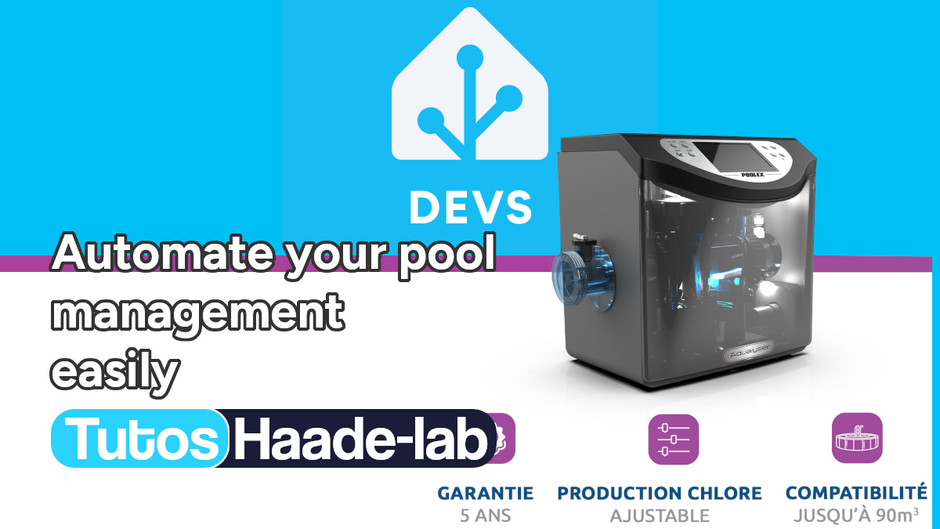
The Poolex Aqualyser Multi is a new generation salt water chlorinator designed to make pool maintenance effortless and to keep your water clean and balanced at all times. Compatible with pools up to 90 m³, this smart system automatically adjusts chlorine production and regulates the pH thanks to its built-in Redox, pH, temperature and flow sensors.
It is more than just an electrolyser: the Aqualyser also works as a pH pump and an ORP controller, for complete and fully automated water management. Confident in its quality, Poolex offers a 5-year warranty on the housing and 10,000 hours on the titanium cell.
When it comes to connectivity, it embeds a Tuya chip running firmware 3.5 and is natively controlled through the Poolex app. That very chip is what lets us bring it into Home Assistant over a direct local connection — without going through the Tuya cloud.
Two versions available
The Aqualyser comes in two versions to fit every type of installation:
- Total version: compact, designed for an easy installation, ideal for above-ground pools and tight spaces
- Flex version: modular, for traditional technical rooms that need a custom installation
Technical specifications
| Parameter | Value |
|---|---|
| Pool volume | < 90 m³ |
| Chlorine output | 20 g/h max. Adjustable (4, 8, 12, 16 and 20 g/h) |
| pH- pump flow rate | 2 l/min |
| Max. power / standby | 150 W / 5 W |
| Hydraulic connection | D50 mm glue-in |
| Polarity reversal | Yes, adjustable: 4 / 6 or 8h |
| Required salinity | From 2.7 to 5 g/L (ppm) |
| Built-in probes and sensors | REDOX, pH, temperature & flow |
| Operating modes | ORP / Timer / Manual / pH minus |
| Connectivity | Wi-Fi — Poolex app (Tuya) |
| Circulation pump relay control | Yes (dry contact) |
| Alarms | On error (audible sound can be disabled) |
| History | Graphical logging of ORP, pH, energy, salt, temperature |
| PoolTerre | Yes (ground bar connection < 20 ohms) |
| Analysis chamber | Yes |
| Housing warranty | 5 years |
| Titanium cell warranty | 10,000 hours |
How much salt do you need?
Recommended salinity is 2.7 to 5 g/L (that is 2.7 to 5 kg/m³). Here are indicative quantities depending on the volume:
| Pool volume | Salt required |
|---|---|
| 10 m³ | 27 to 50 kg |
| 20 m³ | 54 to 100 kg |
| 50 m³ | 135 to 250 kg |
Check the salt concentration regularly, especially after heavy rain or partial water renewals.
What the Aqualyser Multi exposes in Home Assistant

What the Poolex Aqualyser Multi exposes as data and commands:
Info
Both files needed for this integration — the tuya-local device file and the automation blueprint — are freely available on the haade-administrator/blueprint_poolex_aqualyser GitHub repository.
View the files on GitHub
| Feature | Type | Description |
|---|---|---|
| Main switch | Switch | Turn the Aqualyser on / off |
| Output (read-only) | Sensor | Current production level in % |
| Pool volume | Number | Set the volume in m³ (5 to 200 m³) |
| Chlorination time | Number | Treatment duration in hours (1 to 24h) |
| Polarity reversal interval | Number | How often the electrodes are rinsed, in hours |
| BOOST mode | Switch | Enable maximum output mode |
| Output level | Number | Set the production rate in % |
Warning
The Poolex Aqualyser Multi salt chlorinator works locally over Wi-Fi. It must be on the same Wi-Fi network as your Home Assistant instance.
Prerequisites
Before you start, make sure you have:
- A Poolex Aqualyser Multi connected and working through the Poolex/Smart Life app
- An up-to-date Home Assistant instance (2024.x minimum recommended)
- HACS 2.0 installed on your Home Assistant
- a Smart Life account with the Poolex Aqualyser added
- A file editor to add the poolex_aqualyser.yaml file

Step 1 — Install Tuya Local through HACS
Tuya Local is a community integration that lets you control Tuya devices locally, without relying on the cloud. It supports hundreds of devices thanks to a library of YAML description files maintained by the community.
1.1 Add the repository in HACS
In Home Assistant, open HACS and click the ⋮ menu → Custom repositories. Add the following URL with the Integration category:
https://github.com/make-all/tuya-local

Or click the button above to add the repository and install Tuya Local from HACS.
1.2 Install the integration
Once the repository is added, search for Tuya Local in HACS → Integrations, install it and then restart Home Assistant.
1.3 Add the integration in Home Assistant
After the restart, go to Settings → Devices & services → + Add integration, search for Tuya Local and follow the steps:
3. Find your user code
Open the Smart Life app on your smartphone — there is no need to install the official Poolex app: the Poolex Aqualyser must be added to the Smart Life app.
- Go to the Profile tab (bottom right)
- Tap Settings (gear icon, top right)
- Tap Account and security
- The user code is displayed on this page — copy it
Info
The user code (also called uid) is unique to your Smart Life account. It looks like an alphanumeric string such as 'eu1234567890abcd'. Tuya Local uses this code to automatically retrieve the device_id and the local_key of each device without you having to go to iot.tuya.com.
4. Enter the user code in Tuya Local

When configuring the Tuya Local integration in Home Assistant, enter this user code in the dedicated field. The integration then automatically retrieves the device_id and the local_key for every device detected on your local network.
Warning
The local_key can change if you add or remove a device from the Smart Life app. In that case, run the Tuya Local configuration again to update it.
Step 2 — Add the Poolex Aqualyser device file to Tuya Local
Tuya Local recognises devices through YAML configuration files describing their data points (DPs). I created and maintain the description file for the Poolex Aqualyser Multi, covering all the data and commands of the device.
The poolex_aqualyser.yaml device file
Here is the device description file I wrote, which covers every data point of the device:
name: Salt chlorinator
products:
  - id: uabbsm8ioqunhgos
    manufacturer: Poolex
    model: Aqualyser Multi
    model_id: B3CR

entities:
  # Main switch (dp 101)
  - entity: switch
    dps:
      - id: 101
        name: switch
        type: boolean

  # Reported output level (dp 102, read-only)
  - entity: sensor
    name: Output
    dps:
      - id: 102
        type: integer
        name: sensor
        unit: "%"
        class: measurement

  # Pool volume (dp 103)
  - entity: number
    name: Pool volume
    category: config
    icon: "mdi:pool"
    dps:
      - id: 103
        type: integer
        name: value
        unit: m³
        range:
          min: 5
          max: 200
        mapping:
          - step: 5

  # Chlorination time (dp 104)
  - entity: number
    name: Chlorination time
    category: config
    icon: "mdi:timer-outline"
    dps:
      - id: 104
        type: integer
        name: value
        unit: h
        range:
          min: 1
          max: 24

  # Polarity reversal interval (dp 105)
  - entity: number
    name: Reverse interval
    category: config
    icon: "mdi:swap-vertical"
    dps:
      - id: 105
        type: integer
        name: value
        unit: h
        range:
          min: 2
          max: 8
        mapping:
          - step: 2

  # BOOST mode (dp 106)
  - entity: switch
    name: Boost
    icon: "mdi:car-turbocharger"
    category: config
    dps:
      - id: 106
        name: switch
        type: boolean

  # Output level - setting (dp 107)
  - entity: number
    name: Output level
    category: config
    icon: "mdi:signal"
    dps:
      - id: 107
        type: integer
        name: value
        unit: "%"
        range:
          min: 20
          max: 100
        mapping:
          - step: 20
Checking recognition
Once the integration is configured with the right IP and local_key, Tuya Local tries to recognise the device automatically through its product_id. If the Poolex Aqualyser Multi is detected correctly, all the entities listed in the Devices & services section of Home Assistant will show up.
Step 3 — Create the required Helpers
The automation blueprint needs two helpers in Home Assistant. Create them before importing the blueprint.
Helper 1 — Filtration Timer (Mandatory)
This timer is used by the blueprint to handle the automatic stop of the filtration pump. Its duration is computed and injected dynamically by the blueprint — there is no need to set a default duration.

- Go to Settings → Devices & services → Helpers
- Click + Create helper → Timer
- Fill in:
- Name:
Timer Filtration - Duration: leave empty or
0 - Restore state on restart: ✅ enabled
- Name:
- Click Create
Helper 2 — High bather load (Optional)
This toggle helper lets you switch between normal and high bather load. It affects the chlorination and filtration durations in the 28–30°C range.
- Go to Settings → Devices & services → Helpers
- Click + Create helper → Toggle
- Fill in:
- Name:
Pool High Bather Load
- Name:
- Click Create
Info
If you do not create the high bather load helper, the blueprint still works in normal load mode by default. You can always add it later.
Step 4 — Import the automation Blueprint
This is where the whole power of this integration comes in: the complete automation blueprint developed specifically for the Poolex Aqualyser Multi.
What the blueprint does
This blueprint fully automates the chlorinator management while following the official Poolex manufacturer recommendations:
Built-in safety:
- ❄️ Winter safety: the Aqualyser and the pump switch off automatically when the water temperature drops below 10°C
- 🔄 Automatic restart: if the Aqualyser is turned off manually (from the app or physically), it starts again automatically as soon as the temperature is back above 10°C
Adaptive chlorination based on temperature:
| Temperature | Normal bather load | High bather load |
|---|---|---|
| T° < 10°C | Aqualyser OFF + Pump OFF | — |
| 10°C ≤ T° < 20°C | 2h | — |
| 20°C ≤ T° < 25°C | 4h | — |
| 25°C ≤ T° < 28°C | 6h | — |
| 28°C ≤ T° < 30°C | 8h | 12h |
| T° ≥ 30°C | 24h | BOOST 100% / 24h |
Adaptive filtration based on temperature (granular):
| Temperature | Filtration duration |
|---|---|
| ≥ 10°C | 5h |
| ≥ 12°C | 6h |
| ≥ 14°C | 7h |
| ≥ 16°C | 8h |
| ≥ 18°C | 9h |
| ≥ 20°C | 10h |
| ≥ 22°C | 11h |
| ≥ 23°C | 12h |
| ≥ 25°C | 12h |
| ≥ 26°C | 14h |
| ≥ 27°C | 15h |
| ≥ 28°C | 16h |
| ≥ 29°C | 20h (high load: 24h) |
| ≥ 30°C | 24h |
Production rate based on pool volume:
| Volume | Production rate |
|---|---|
| ≤ 15 m³ | 20% |
| ≤ 30 m³ | 40% |
| ≤ 50 m³ | 60% |
| ≤ 60 m³ | 80% |
| ≤ 80 m³ | 100% |
Polarity reversal based on water hardness (TH):
| Water hardness TH | Reversal interval |
|---|---|
| TH < 30°f | 8h |
| TH < 40°f | 6h |
| TH < 50°f | 4h |
| TH ≥ 50°f | 2h |
Supported triggers:
- ⏰ Daily start at a configurable time
- 🌡️ Crossing of each temperature threshold (15 thresholds from 10°C to 30°C)
- 🏠 Home Assistant start
- 👥 Change of the high bather load switch
- 🔌 Detection of the Aqualyser being switched off → auto restart if T° ≥ 10°C (with a 5s debounce)
- ⏱️ End of the filtration timer → pump stop
Importing the blueprint
Click the button below to import the blueprint straight into your Home Assistant:

Or from the Home Assistant UI: Settings → Automations & scenes → Blueprints → Import blueprint and paste the URL:
https://github.com/haade-administrator/blueprint_poolex_aqualyser/blob/main/poolex_aqualyser_blueprint.yaml
Step 5 — Create the automation from the Blueprint
Once the blueprint is imported, all that is left to do is create the automation and configure it with your entities.
Go to Settings → Automations & scenes → + Create automation → From a blueprint and select “Poolex Aqualyser - Filtration & Chlorination Management”.
Parameters to fill in:
- Aqualyser switch → the Poolex
switchentity (main switch) - Boost switch → the Poolex
switch.boostentity - Chlorination time number → the
number.chlorination_timeentity - Output level number → the
number.output_levelentity - Reverse interval number → the
number.reverse_intervalentity - Filtration pump → the switch entity of your pump
- Temperature sensor → your pool water temperature sensor
- Timer Filtration → the timer helper created in step 3
- Start time → the time at which the cycle should start every day
- Pool volume → the volume of your pool in m³
- Water hardness (TH) → the hardness of your water in French degrees
- High bather load (optional) → the toggle helper created in step 3
Warning
Make sure the temperature sensor you use reports the pool water temperature and not the ambient temperature. An immersed probe or a sensor on the filtration return will be the most accurate.
Enable the automation and Home Assistant now runs your pool fully autonomously, adapting the treatment and filtration durations in real time according to the water temperature.
How it works in practice
Here is an example of what the blueprint triggers on a hot summer day with a 30 m³ pool, water at 27°C and a hardness of 25°f:
- At the scheduled time, the cycle starts
- The blueprint reads the temperature (27°C) and computes:
- Chlorination duration: 6h
- Filtration duration: 15h
- Production rate: 40% (30 m³ pool)
- Polarity reversal interval: 8h (TH < 30°f)
- The Aqualyser is switched on with the right settings injected through Tuya Local
- The filtration pump starts and the 15h timer is launched
- After 6 hours of chlorination, the Aqualyser switches off automatically
- After 15 hours, the timer expires and the pump stops
If in the meantime the temperature crosses a threshold (going from 27°C to 28°C for example), the blueprint recalculates immediately and updates the treatment durations accordingly — without any action from you.
Official Poolex video tutorials
Poolex publishes complete installation and configuration tutorials for the Aqualyser on its YouTube channel. I recommend watching them before starting the physical installation.
Installing and connecting the Aqualyser Total — Full tutorial
This first official Poolex tutorial covers the entire 8-step installation: unboxing, hydraulic and electrical installation, initial setup, probe calibration, pH pump test and Wi-Fi connection to the app.
Info
This tutorial is about the Total (compact) version. If you own the Flex (modular) version, Poolex also offers a full installation and configuration guide dedicated to that model on the same YouTube channel.
Complete Aqualyser Flex installation guide
For owners of the Flex version, intended for traditional technical rooms, Poolex offers a dedicated video guide covering the specifics of its modular installation.
Warning
The electrical and hydraulic installation of the Aqualyser must be carried out by a qualified professional. These videos are provided for information only. Any non-compliant installation may void the warranty.
Fixing a falling pH - Aqualyser Total
In this tutorial, we show you how to fix a pH problem that drops instantly on the Aqualyser Total.
Customer reviews and feedback
Before integrating the Aqualyser Multi into Home Assistant, I naturally looked into user feedback. Here is an honest dashboard of what stands out from forums and verified reviews.
What users like
Positive feedback keeps coming back to a few strong points:
The all-in-one versatility is unanimously praised. The Aqualyser is an electrolyser, an ORP controller and a pH pump at the same time — a combination that dramatically simplifies the technical installation and reduces the number of devices in the technical room.
Automation is the second strength. Automatic chlorine and pH regulation based on real-time measurements is perceived as real freedom. Several users report not touching their water treatment manually for the whole season.
The Poolex app gets good feedback for its readability and its alerts when something goes wrong. Checking pH, ORP and temperature graphs remotely reassures owners who go on holiday.
The titanium cell rated for 10,000 hours is also an argument for trust, especially compared with other brands whose cells wear out faster in hard water.
Things to know before buying
Warning
Poolstar after-sales service (Poolex group) is reported to sometimes be slow to answer during peak periods (spring/summer). It is recommended to go through an approved local dealer for a more responsive follow-up.
Probe quality: some users report pH or REDOX probes that need more frequent recalibration in very hard water (TH > 40°f). The blueprint’s polarity reversal protocol is precisely designed to counter this phenomenon.
Network compatibility: the Aqualyser only supports 2.4 GHz Wi-Fi. If your technical room is far from your internet box, a Wi-Fi repeater or a separate access point connection will be needed.
The Home Assistant integration solves several limitations of the official app: no long-term history in Poolex, no automatic adaptation to the water temperature, no high bather load mode. With the blueprint, these gaps disappear completely.
Personal experience
For my part, the integration through Tuya Local is remarkably stable. The direct local communication removes any dependency on the Tuya cloud — which means that even if the Poolex servers are unavailable, your automation keeps running perfectly. That is a considerable advantage compared with controlling everything through the app alone.
The reported data points (output rate, temperature, boost mode) also let you build complete tracking dashboards in Home Assistant, or even cross automations (stop the Aqualyser if you detect a pump failure, send a notification if the temperature goes above a threshold, and so on).
Frequently asked questions
Can I use this blueprint with the Aqualyser Total version (not Multi)? The blueprint was designed for the Multi model, which exposes the output, boost and chlorination data points through Tuya. The Total version may have different DPs — check the GitHub repository for any updates.
My Aqualyser is already paired with the Poolex app. Is that a problem? No, you can keep the Poolex app installed. Tuya Local and the official app coexist without conflict. However, commands sent from the app can sometimes be overridden by the blueprint a few seconds later — that is normal.
Does the blueprint work if Home Assistant restarts in the middle of a filtration cycle? Yes. The filtration timer helper is configured to restore its state on restart. On the next HA start, the timer resumes where it left off.
Can I change the filtration or chlorination durations computed by the blueprint? The blueprint strictly follows Poolex recommendations. If you want to customise the values, you will need to edit the blueprint YAML directly — which is entirely possible for advanced users.
Conclusion
Integrating the Poolex Aqualyser Multi into Home Assistant through Tuya Local is a real success. Where the official app is limited to manual control, Home Assistant turns this chlorinator into a fully autonomous, smart and adaptive water treatment system.
What I particularly like about this solution:
- ✅ 100% local communication — no cloud, no latency, no risk of outage
- ✅ Manufacturer recommendations respected — durations and rates are computed from the official Poolex guide
- ✅ Restart-proof — the timer survives Home Assistant restarts
- ✅ No code to write — everything is configured through the blueprint UI
- ✅ Modularity — high bather load mode is enabled with a switch for busy swimming days
- ✅ Advanced tracking — Tuya data lets you build complete dashboards in HA
The tuya-local device file and the blueprint are freely available on GitHub, maintained and open to contributions. If you own a Poolex Aqualyser Multi and Home Assistant, you no longer have any excuse to manage your pool by hand.
Enjoy your swim! 🏊♂️

Articles that might interest you
Nuki Smart Lock Ultra, Fob and Door Sensor test the ultimate smart lock
Some time ago I tested the Tedee Go smart lock and its accessories. The product left me with an unfinished feeling: noisy (70dB!), power-hungry and limited in connectivity. Today I’m...

Kincony B8M ESP32 8-channel MOSFET controller test for irrigation
I’ve been looking for a compact and silent multi-channel controller to drive my 24V DC irrigation system for quite some time. After testing Zigbee solutions like the Sonoff SWV or...
Dahua SD1A404DB-GNY the full option PTZ camera in Frigate
Following my Reolink Trackmix Poe camera test, I mentioned having found my ideal camera with a Dahua model. Well, here we are! Let me introduce the Dahua SD1A404DB-GNY, a compact...
Comments